
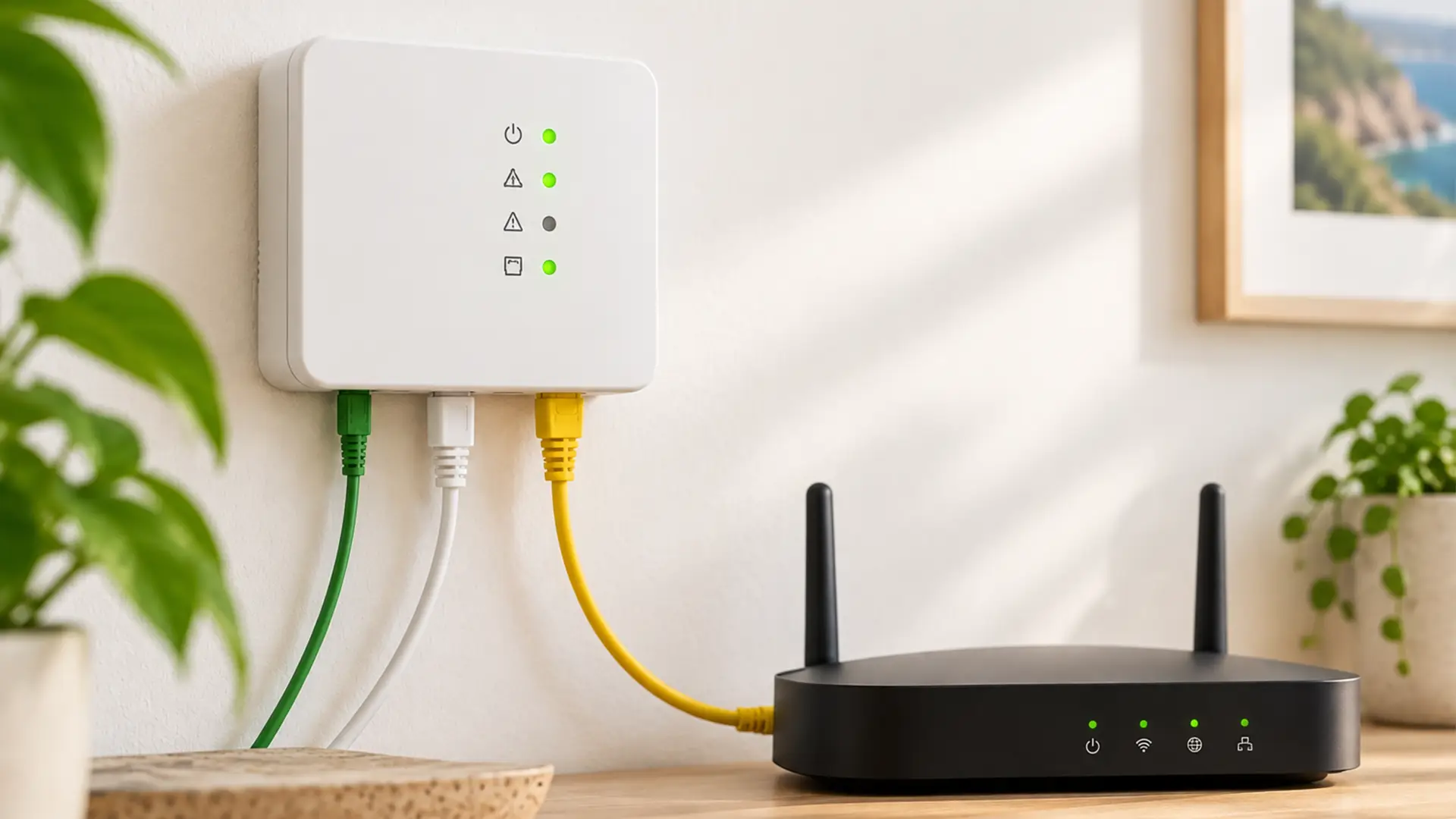
Your router isn’t the only box keeping your Full Fibre connection going. Take a look at the wall nearby and you might spot another.
That’s your ONT, or Optical Network Terminal. It connects the fibre optic cable coming into your property to your router, forming the link between your home and the Full Fibre network.
Here’s what an ONT does, how it works and what those little lights are trying to tell you.
What Does ONT Stand For?
ONT stands for Optical Network Terminal.
It’s a small box installed in your home as part of your Full Fibre broadband setup, also known as Fibre to the Premises (FTTP).
The fibre optic cable coming into your property runs to the ONT, which then links to your broadband router, usually via an Ethernet cable.
This allows your router to take over, distributing your broadband connection around the home over Wi-Fi or Ethernet.
What Does an ONT Do?
Full Fibre broadband sends data through fibre optic cables using pulses of light. Great for delivering seriously speedy broadband, but your router needs a little help making use of it.
Your ONT sits between the two. It receives the optical signal coming through the fibre cable and provides the connection your router needs to get you online.
So, despite being a fairly unassuming box, your ONT has an important job.
Without it, your Full Fibre connection can't make that final hop from the fibre network to your router.
Is an ONT the Same as a Router?
No. Your ONT and router are two different pieces of equipment, and they have different jobs.
The ONT connects your home to the Full Fibre network.
Your router connects to the ONT and then shares your broadband connection with your phones, laptops, TVs, consoles and other devices. That's usually done over Wi-Fi, although you can also connect devices directly to the router using Ethernet cables.
So if you're staring at two boxes wondering which one's responsible for the Wi-Fi, it's the router.
Your ONT doesn't create your home Wi-Fi network.
Is an ONT a Modem?
An ONT performs a similar role to the modem used with some older types of broadband, but the technology behind it is different.
Traditional modems are designed for broadband delivered over copper-based connections. An ONT is specifically designed to work with a fibre optic connection.
You may hear an ONT described as a fibre modem, particularly when people are explaining Full Fibre in simple terms. Technically, Optical Network Terminal is the more accurate name.
Where is the ONT in My House?
Your ONT is usually a small box fixed to an internal wall near the point where the fibre cable enters your home.
Exactly where it sits will depend on your property and how your Full Fibre installation was completed.
It also needs power, so you'll usually find it within reach of a plug socket.
If you're trying to find yours, look for a wall-mounted box with lights labelled with terms such as Power, PON, LOS and LAN. The exact design and labels can vary depending on the equipment and network being used.
Once you've found it, you've found one of the key bits of kit behind your Full Fibre connection.
What do the Lights on an ONT Mean?
Those lights are a quick way to check what's happening with your Full Fibre connection.
The exact lights can vary between ONT models, but there are a few common ones you may see.
Power
As the name suggests, the Power light tells you whether the ONT is receiving power.
If there's no power light at all, check that the ONT's power cable is connected securely and that the socket is switched on.
PON
PON stands for Passive Optical Network.
This light relates to the connection between your ONT and the fibre network. On an Openreach ONT, a solid green PON light is normally what you want to see.
LOS
LOS stands for Loss of Signal.
This is one to pay attention to if your broadband has stopped working. A red or illuminated LOS light can indicate that your ONT isn't receiving the fibre signal as expected.
If you're using an Openreach ONT and the PON light is solid green while the LOS light is off, that's generally a sign that the fibre connection to the ONT is working normally.
LAN
The LAN light relates to the Ethernet connection between the ONT and your router or other connected equipment.
Depending on the ONT, it may light up or flash when there's a working connection and data is moving between the devices.
Why is My ONT Showing a Red Light?
A red light can indicate a problem, but what it means depends on which light is red and which ONT you have.
If the LOS light is red, for example, your ONT may have lost the incoming fibre signal.
Before reaching for every cable in sight, check the basics.
Make sure your ONT has power and that its cables haven't been knocked or disconnected. You can also check whether your router is powered on and connected correctly.
Avoid pulling out or interfering with the fibre cable itself. Fibre connections can be more delicate than the familiar Ethernet cables around your router.
If the warning light remains or your broadband still isn't working, contact your broadband provider for help.
How Does a Router Connect to an ONT?
For most Full Fibre setups, the connection is pretty simple.
An Ethernet cable runs from the appropriate port on your ONT to the internet or WAN port on your router.
Your router then takes over, creating your home network and connecting your devices to the internet.
If you're setting up a new router, make sure you're using the correct port on both pieces of equipment. It's also worth checking any setup instructions supplied by your broadband provider, as configuration can differ between services.
Does an ONT Provide Wi-Fi?
No. An ONT doesn't normally provide the Wi-Fi network you connect your devices to.
That's your router's job.
Your ONT deals with the Full Fibre connection coming into the property, while your router handles the home network on the other side.
If your Full Fibre connection appears to be working but you're struggling with Wi-Fi in a bedroom, loft or other far-flung corner of the house, the ONT probably isn't the problem. Your router placement, Wi-Fi coverage or home layout may be worth investigating instead.
Do I Need an ONT for Full Fibre broadband?
If you have an FTTP Full Fibre connection, you'll generally need an ONT installed at the property to connect to the fibre network.
This is one of the differences between Full Fibre and older broadband technologies.
With Fibre to the Cabinet (FTTC), fibre only travels as far as the street cabinet. The final stretch into the home usually runs over the existing copper phone line.
With FTTP, fibre travels all the way to the property. That's why an ONT is needed inside the home.
What Happens When an ONT is Installed?
If your home doesn't already have Full Fibre equipment, an engineer may need to install the fibre connection and ONT.
The fibre cable is brought from the network to your property and routed to an appropriate entry point. Inside, the ONT is fitted to the wall and connected to the incoming fibre.
Your router can then be connected to the ONT.
Where possible, it's worth thinking about where you'd like your broadband equipment before installation day.
Router location can make a difference to Wi-Fi coverage, so hiding everything in the deepest, darkest corner of the house may come back to haunt you.
The engineer will need to work with what's possible at the property, but discussing the location beforehand can help.
Does an ONT Need Power?
Yes. Your ONT needs electricity to work.
That means if there's a power cut, your ONT will usually stop working too unless there's a suitable backup power solution in place.
If your broadband suddenly disappears, checking whether the ONT has power is one of the quickest troubleshooting steps you can take.
Can I Turn my ONT Off?
You can switch off the power to an ONT, but doing so will stop your Full Fibre connection from working.
For day-to-day use, there's usually little reason to keep switching it on and off.
If you're troubleshooting a connection problem, follow the instructions from your broadband provider rather than repeatedly disconnecting the ONT or fibre cable.
Can I Move my ONT?
An ONT isn't quite as easy to move around as a router.
It's connected to the fibre cable entering your property and is normally installed in a fixed position. Fibre cables also need to be handled carefully.
If the location of your ONT is causing a problem, speak to your broadband provider about the options rather than trying to relocate the equipment yourself.
You can often get more flexibility by changing where your router sits, depending on your setup and the Ethernet cabling available.
Should I Take my ONT When I Move House?
No. If you're moving home, the ONT will usually need to stay at the property.
For example, Openreach advises customers to leave its ONT, power supply and cables behind when moving house.
That's because the ONT forms part of the Full Fibre setup for that property. Your new home will have its own broadband installation requirements.
Your router is a different matter, so check with your broadband provider about what equipment you need to take with you.
What Should I Do if My ONT isn't Working?
If you've lost your Full Fibre connection, a few simple checks can help narrow down what's happening.
Start by checking that the ONT has power. Then look at its lights, particularly the PON and LOS indicators if your model has them.
Check the Ethernet cable running between the ONT and router is securely connected at both ends, and make sure the router itself is switched on.
If everything looks connected but there's still no broadband, your provider can run further checks and help identify whether the issue is with the fibre connection, ONT, router or wider network.
Try not to unplug the fibre cable or open the ONT. Leave those nooks and crannies to the engineers.
Small Box. Big Job.
You probably won't spend much time thinking about your ONT once your broadband is up and running.
But it's a crucial link in a Full Fibre connection, taking the fibre signal entering your home and handing the connection over to your router.
So the next time someone asks you to check your ONT, you know where to look, what it does and which lights deserve your attention.
And if your ONT looks happy but your Wi-Fi doesn't? Your router might be the next place to investigate.
ONT FAQs
What does ONT mean in broadband?
ONT means Optical Network Terminal. It's the equipment that connects a Full Fibre broadband connection entering your property to your broadband router.
What's an ONT box?
An ONT box is the small piece of equipment installed inside a property with Full Fibre broadband. It connects to the incoming fibre optic cable and then to your router.
Is an ONT a router?
No. The ONT connects to the fibre network, while your router creates your home network and usually provides Wi-Fi.
Does an ONT give you Wi-Fi?
No. Your broadband router normally provides Wi-Fi. The ONT provides the connection between the incoming fibre network and your broadband equipment.
What does PON mean on an ONT?
PON stands for Passive Optical Network. The PON light indicates the status of the ONT's connection to the fibre network.
What does LOS mean on an ONT?
LOS stands for Loss of Signal. If the LOS light is illuminated or red, it can indicate a problem with the incoming fibre signal. Check your provider's guidance for your specific ONT.
Why is my ONT flashing?
Some ONT lights can flash during normal operation, while others may indicate a connection issue. Check which light is flashing and refer to the instructions for your specific ONT model or broadband provider.
Can I connect a router directly to an ONT?
A Full Fibre router is commonly connected directly to the ONT using an Ethernet cable. However, the router may need specific settings from your broadband provider before the internet connection will work.
Do I need both an ONT and a router?
For a typical Full Fibre setup, yes. The ONT connects your property to the fibre network, while the router distributes that internet connection to your devices.
Does every house have an ONT?
No. ONTs are associated with fibre connections that run directly into the property, such as FTTP. Homes using other types of broadband may have a different setup.
